
How to Create a WordPress Site with Bluehost


💡 This post might contain affiliate links. If you use any of these links to buy a product, I will earn a small commission at no additional cost to you. Read my full disclosure for more details.
Want to start a blog but not sure where to begin? Never built a website before? Wondering what web hosting is and what to look for?
I get it — it can feel overwhelming at first. That’s exactly why I created this post: How to Create a WordPress Site with Bluehost — to give you all the answers you need in one place.
There are so many questions when you’re just starting..how to start a WordPress blog, how to create a website, how much it actually costs, and how to turn your blog into something profitable.
The good news? Thanks to the power of open-source platforms and free resources, it’s possible to find the answers you need and take action without spending a fortune.
When I first dipped my toes into blogging, I created a simple site on WordPress.com. But halfway through, I realized I was stuck. I couldn’t add any plugins, and key features were missing. I remember thinking, Wait… what’s going on?!
I started another research and found out that I was using the wrong WordPress…
Sounds weird, right? How is that possible? WordPress is just one platform? Well…
There are two different platforms for WordPress sites, actually: WordPress.com and WordPress.org.
(I wish I knew that before and didn’t waste my time trying to figure out things on WordPress.com, but we learn from our mistakes. That is how we grow.)
What are the differences?
WordPress.com
- It’s free (up to 3GB)
- You can’t have a custom domain
- No plugins allowed
- Limited themes
- Limited SEO control
- No online store allowed
- No maintenance
- Limited Analytics
WordPress.org
- Paid ($46-100 per year)
- Plugins allowed
- More choices for themes
- Monetization and Branding freedom
- All SEO features
- Useful Analytics
- Online store allowed
- Maintenance
We have to make a choice toward WordPress.org if we want to have a better quality website.
Creating the website wasn’t that hard. WordPress offers a lot of helpful features, and honestly, for someone like me, who had no idea how to build a website before, it was doable. I spent about three weeks figuring things out on my own…
And while I made good progress, I quickly realized something important: I was spending all my time building the website instead of writing blog posts
To save time, I decided to hire a developer on Upwork to help me pick up where I left off. It turned out to be a great experience. The freelancer helped me bring my blog to life. I’ll admit, I didn’t make that decision right away. I was nervous about giving full access to my site to someone I didn’t know. But sometimes, if you don’t take a risk, you don’t move forward. You have to trust your gut.
Once I made the switch from WordPress.com to WordPress.org, the next big decision was choosing a hosting platform.
I was looking for a hosting place for my website on the internet, and I found there are a lot of choices with web hosting and WordPress hosting providers, and among many of them, I chose Bluehost. Because it seemed the ideal platform to host a website.
Why I Choose Bluehost as My Website Hosting
Here are the main reasons why I chose it:
- They have a live 24/7 Support chat, which is VERY convenient as you do not have to fill out a lot of information before talking to a real person, and they get back to you quickly.
- They offer a FREE Domain Name for 1st Year. I had mine already from another provider, and it was super easy to transfer. I did nothing. They did it for me.
After that, I realized, though, that I can’t link pages to my domain because of the DNS problem. They helped me in 5 minutes. All I had to do was change the DNA address.
- Bluehost hosting offers a FREE SSL Certificate.
This protects your sensitive information as it travels across the world’s computer networks. SSL is essential for protecting your website.
- They have an easy 1-Click WordPress Install. I didn’t have to deal with any WP hassle, as I could quickly install it and use it right away.
- They provide many FREE PLUGINS. After I could not install any plugin on my free WP.com site, this was a big relief for me. Now I just installed as many plugins as I want for FREE.
- It has a Fast Page Loading Speed
An important thing to look at when choosing a web host is loading speed. You want to have a quick loading speed, so potential customers and site visitors don’t abandon your site before they get to see what you sell or offer. Bluehost covers all that.
- Bluehost is User-Friendly. It uses the most popular Control Panel. It has a clean design, and it makes building your site a quick and easy process, even if you are a novice at building websites.
1.Go to Bluehost and click the GET STARTED green button

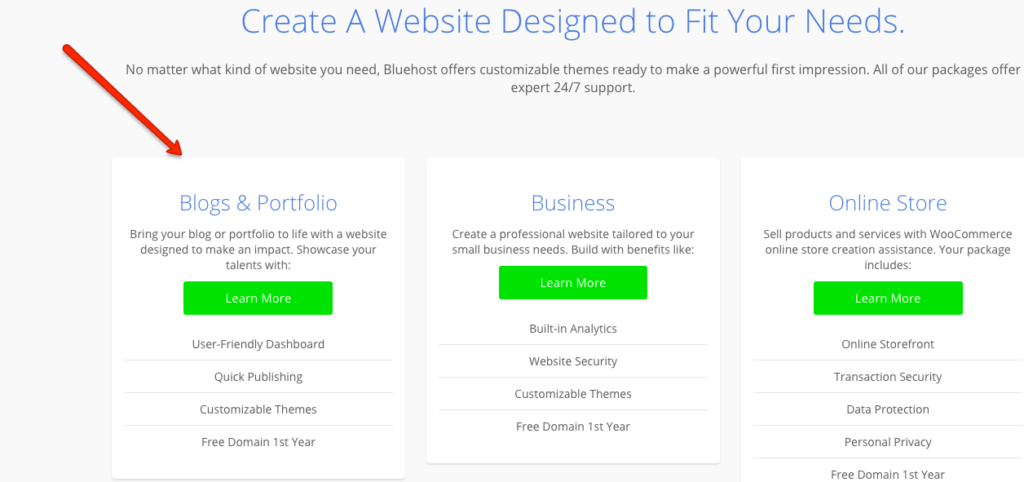
2. Click on Learn More on the first option if you want to create a blog
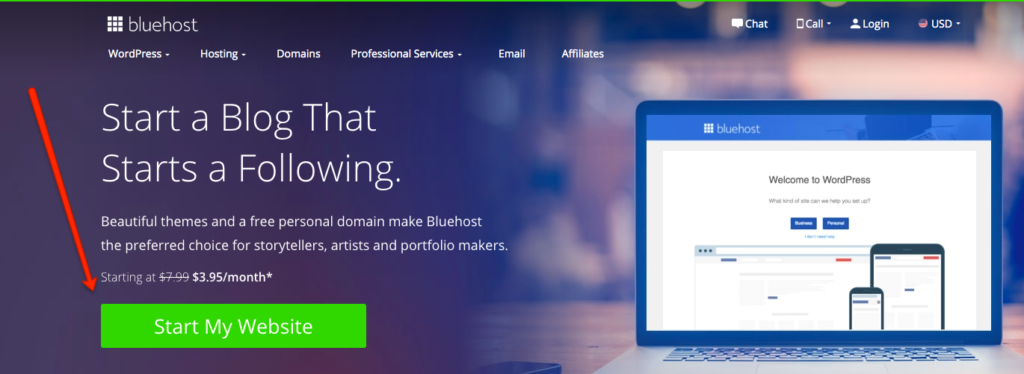
3. Click the Start My Website green button
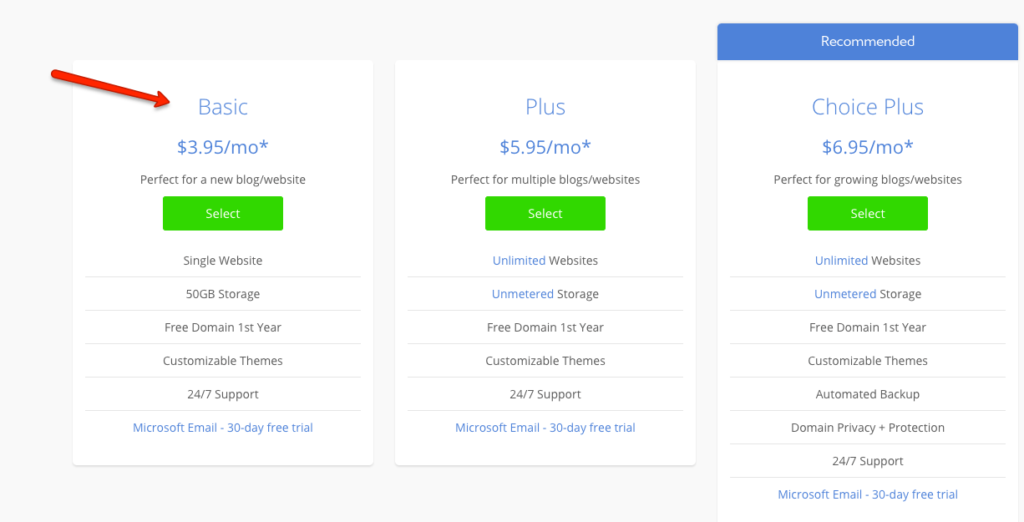
4. Observe all the plans they offer and choose the right one for yourself. For a beginner, Basic should be a good option. Click Select.
5. The next step is to choose your domain name (or use an existing one, if you already have one)

6. a. If you created a new domain, it will redirect you to the Confirmation/Account Information page

6. b. If you selected Use a domain you own, it will redirect you to the same Account Information page, but you won’t see any confirmation messages at the top

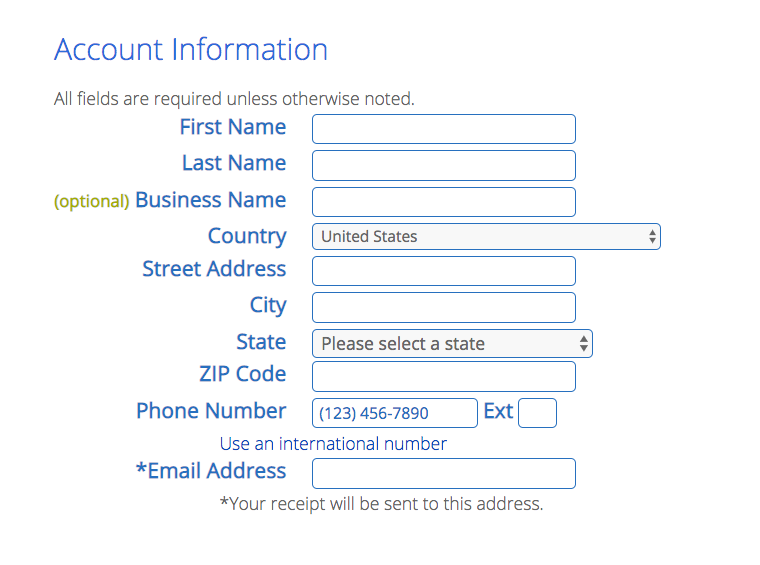
7. Enter your account information right here
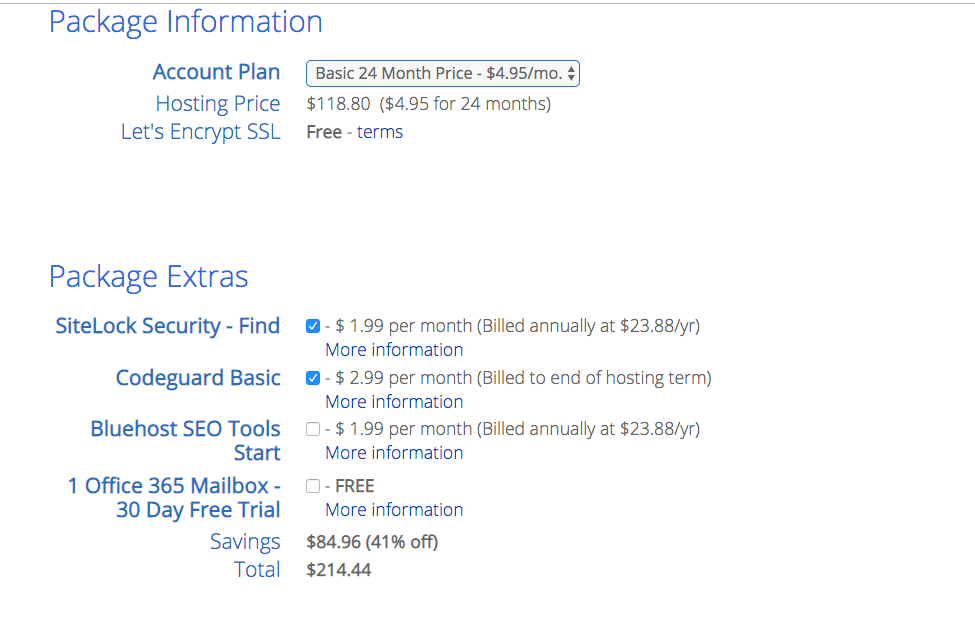
8. Enter your package information. You can select a 12, 24, or 36-month plan. Select the package extra if you need it
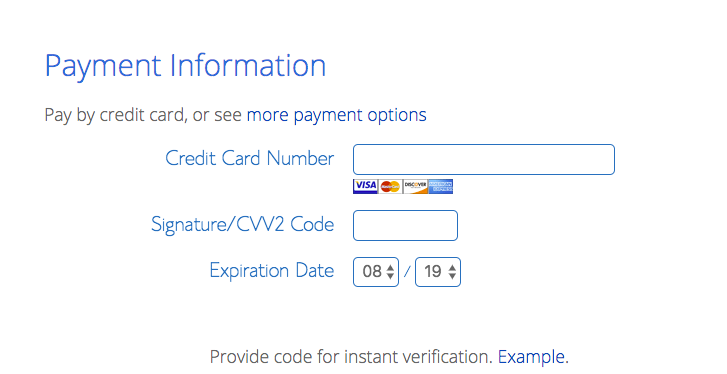
9. Enter your payment information
10. Check the box you read and agree to Bluehost’s Terms of Service and Cancellation Policy, and click the SUBMIT button

11. You are done. Now you officially have a host for your website. You can launch it at any time.
Final Thoughts
Dealing with website issues in the early stages can be much easier when you know the reasons behind them and have all the information you need. Choosing web hosting for your site doesn’t have to be a big deal either. Thanks to great customer support on many platforms, you get 24/7 access to helpful resources and quick answers to your questions.
I chose Bluehost and I’ve never regretted it. It’s affordable, reliable, and always accessible when I need it.
Their customer support helped me resolve so many website issues right away. I reached out to them, and it honestly made my life so much easier. They always explained what caused the issues, offered options to avoid them in the future, and even gave tips on how to improve my site’s optimization.
I hope you found my post on how to create a WordPress site with Bluehost helpful
If you use a different hosting platform, please share it. Thanks for reading.
Save it for later
Travel Resources & Accommodation
- Find the best flight deals on Skyscanner and Kiwi
- Book travel packages on Expedia
- Book hostels worldwide on Hostelworld
- Book hotels worldwide on Hotels.com
- Discover and book affordable tours on GetYourGuide





It is truly a nice and helpful piece of info.
I am glad that you shared this helpful info with us.
Please stay us informed like this. Thank you for sharing.
Keep on working, great job!